

What Is the Best Internet Setup for a St. Petersburg Restaurant
Choose a wired primary circuit (fiber if your address qualifies, high-tier cable if it doesn’t), then back it up with an independent link such as 5G or Starlink. Inside the building, split traffic into two lanes: one for POS and operations, the other for guests. Last, place both gateways on a small UPS so the signal stays up when the lights blink.
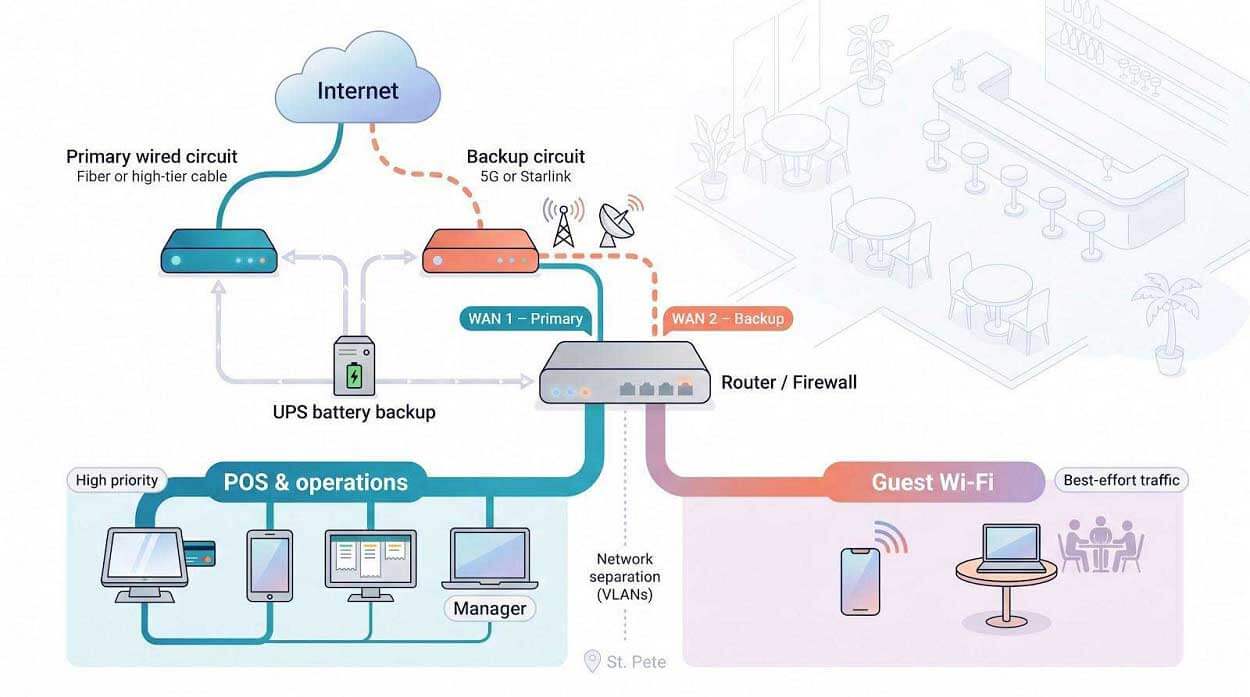
Why does this matter? Industry data shows small-business downtime costs between $127 and $427 per minute. A dual-path, segmented layout keeps diners from throttling payments, lets online orders sail through a cut cable, and satisfies PCI assessors who insist guest phones can’t touch card data. One reliable wire, one path-diverse lifeline, and clear lane markings. That’s the recipe that protects Friday-night revenue.
Compare the Leading Options at a Glance
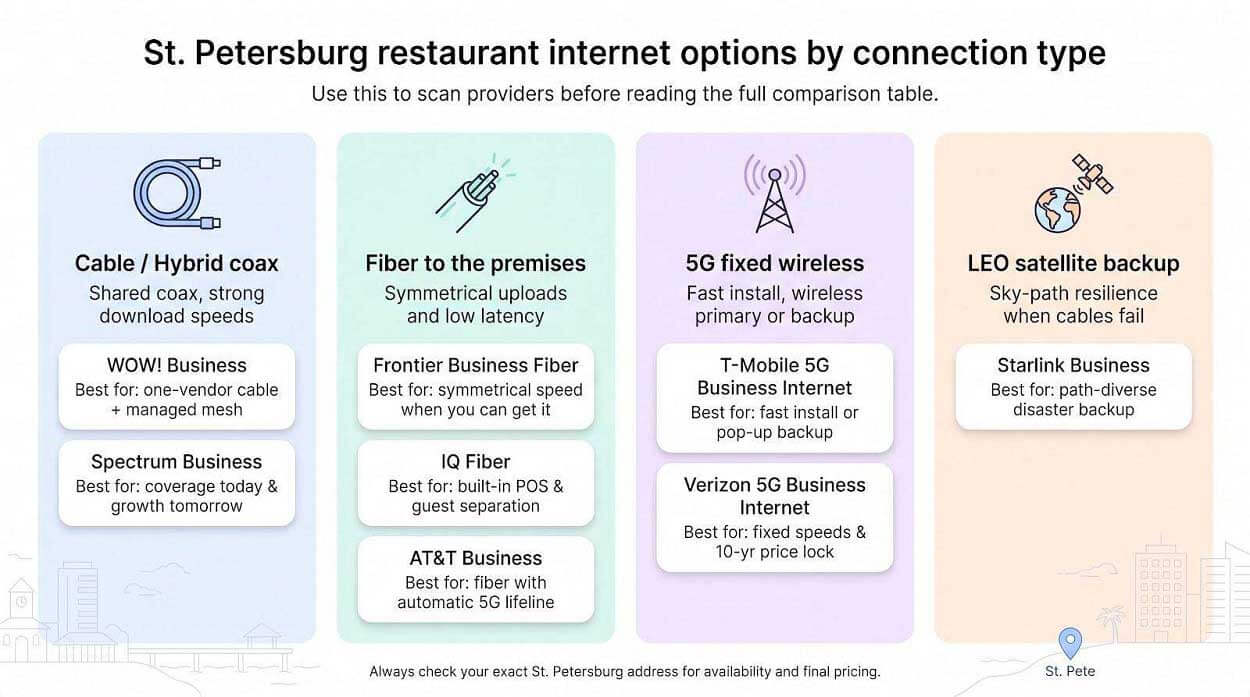
Before we dig into individual pros and cons, here’s a side-by-side view that shows which providers meet core needs such as symmetrical uploads, built-in guest Wi-Fi, or automatic backup, and which ones need extra gear. Prices reflect entry business tiers; always run your exact street address through each provider’s checker for the latest figures.
|
Provider |
Best for |
Connection |
Speed tier(s) |
Price structure |
Guest Wi-Fi included |
Backup option |
Main caveat |
|
WOW! Business |
One-vendor internet + managed mesh |
Cable, symmetrical up to 5 Gig |
300 / 600 Mbps, 1.2 Gig |
600 Mbps from $65.99 on a 1-year term; Price-Lock Guarantee |
Whole-Business WiFi (eero mesh) |
Pair with 5G or Starlink |
Check your exact address |
|
Spectrum Business |
Wide coax footprint, growth path |
Hybrid fiber-coax |
500 Mbps to 1 Gbps down † |
One-year promo, then standard |
Advanced Wi-Fi guest SSID |
“Invincible Wi-Fi” LTE failover |
SLA only on dedicated fiber |
|
Frontier Business Fiber |
Symmetrical performance |
Fiber to premises |
500 Mbps to 5 Gbps sym. |
Two-year price lock; no annual term |
Wi-Fi 7 router guest SSID |
Optional cellular backup |
Address-by-address build |
|
IQ Fiber |
Explicit POS / guest VLANs |
100 % fiber |
1 Gbps & 5 Gbps sym. |
Flat, no-contract pricing |
Multi-SSID managed Wi-Fi |
Static-IP ready; add your own failover |
Limited Pinellas footprint |
|
AT&T Business |
Fiber with built-in 5G backup |
Fiber to premises |
300 Mbps to 5 Gbps sym. |
Month-to-month |
Router guest SSID |
Automatic 5G on 1 Gbps+ |
Backup fails without UPS power |
|
T-Mobile 5G Business Internet |
Fast install or temp sites |
Fixed 5G |
~100 to 360 Mbps down |
Five-year base-rate guarantee |
Wi-Fi 7 gateway guest SSID |
Same modem; dual-WAN advised |
Cellular congestion at rush hour |
|
Verizon 5G Business Internet |
Fixed-speed tiers & 10-yr price lock |
Fixed 5G |
100 / 200 / 400 Mbps |
Ten-year price guarantee |
Gateway SSID; VLAN needs router |
LTE/5G dual-WAN ready |
Upload 8 to 40 Mbps; extra EAC* fee |
|
Starlink Business |
Path-diverse disaster backup |
LEO** satellite |
40 to 220 Mbps down |
Month-to-month + hardware |
None; supply your own Wi-Fi |
Priority-data tiers |
Needs clear sky & roof mount |
† Spectrum is rolling out 2 Gbps coax in select blocks (confirm at checkout).
-
EAC = Economic Adjustment Charge.
** LEO = low-Earth-orbit satellite constellation.
Remember, the “best” tag is context, not a medal. Let’s unpack how those numbers and caveats play out in a real-world kitchen next.
How We Judged Each Provider
We scored every service on seven weighted factors that shape a restaurant’s internet stack:
|
Factor |
Weight |
What we checked |
|
Reliability & recovery |
25 percent |
Written uptime claims, failover options, documented outage recoveries |
|
Network hygiene (POS vs. guest separation) |
20 percent |
Built-in VLANs, guest SSIDs, or the need for extra firewalls |
|
Local availability |
15 percent |
Address checks across downtown, Grand Central, and beach corridors |
|
Speed & latency |
15 percent |
Advertised download, upload, jitter, and real-world cloud POS impact |
|
Price transparency |
10 percent |
Promo vs. month-30 bills, early-termination math, equipment fees |
|
Support & multi-location tools |
10 percent |
24 × 7 escalation, single dashboards, hardware-scaling options |
|
Installation lead time |
5 percent |
Days from signed order to live traffic, plus construction risk |
We then named each winner “best for” a specific use case rather than crowning one overall winner, so you can match the scores to your kitchen’s exact needs.
WOW! Business: Best for a One-Stop Local Setup
If you’d rather juggle sauté pans than vendors, WOW! Business belongs on your shortlist. Its Pinellas, FL business internet services cover Downtown St. Petersburg, Clearwater, Largo, Pinellas Park, Palm Harbor, Dunedin, and surrounding communities, including St. Pete ZIP codes such as 33702, 33705, 33710, and 33713.
Three tiers fit most dining rooms: 300 Mbps for light use (up to 5 connected devices), 600 Mbps for heavier use such as guest networks and security systems (up to 10 devices), and 1.2 Gig for the busiest sites (up to 15 devices). On a one-year term, 600 Mbps starts at $65.99 a month, and doubling to 1.2 Gig costs just $5 a month more. For upload-heavy kitchens with cameras and cloud reports, WOW! also offers symmetrical speeds of up to 5 Gig.
Whole-Business WiFi sweetens the deal. You start with two eero devices that build a mesh network across the whole floor, and you can add more, like adding bar stools. The eero app makes it easy to run a separate guest network, so diners scroll on one lane while payments stay on another.
Every plan includes built-in security that blocks malicious domains and URLs, and support is U.S.-based and runs 24/7/365. If a modem blinks at 8 pm, you call a domestic team. New customers also get free installation, a free modem for the first three months, a $10 monthly discount when they bundle phone service, a Price-Lock Guarantee that keeps the rate flat for the contract period, and a 60-day satisfaction guarantee, enough to stress-test through a full holiday cycle.
WOW! shines when you want internet, voice, and managed Wi-Fi on one invoice, a real benefit for independent owners without an IT firm on speed dial. If your POS vendor requires its own network, add a small firewall with VLANs behind the WOW! gateway.
Bottom line: a solid cable backbone, plug-and-play mesh, and one vendor to call when Wi-Fi hiccups make WOW! a smart pick if simplicity tops your menu of requirements.
Spectrum Business: Best for Coverage Today and Growth Tomorrow
If your first requirement is “just reach my block,” Spectrum Business is often the quickest yes. Its hybrid fiber-coax network blankets downtown and the beach corridors, so installation rarely takes more than a single truck roll.
Entry plans start at 500 Mbps down for about 65 per month after the online promo ends. Step up to 750 Mbps or 1 Gbps, and Spectrum bundles in Advanced Wi-Fi, a gateway with a separate guest SSID and optional mesh pods. Some neighborhoods now list 2 Gbps over coax, but always run your exact street through the checker before counting on that speed.
Bars and larger dining rooms can move up to Managed Wi-Fi, an enterprise service that adds dedicated VLANs, captive splash pages, bandwidth tiers, and proactive monitoring, all within the same dashboard national chains use.
Need insurance against an outage? Invincible Wi-Fi pairs the gateway with an LTE modem that takes over automatically when the cable drops. Keep both devices on a UPS, because failover stops when the power does.
Two caveats stay critical:
-
Business Internet arrives over coax, even if marketing calls it “fiber-powered.” True dedicated fiber is a separate SKU with a signed SLA and a very different price tag.
-
Promotional rates last 12 months; month 13 reverts to Spectrum’s standard tariff.
For operators who want a wide-footprint provider today and a smooth route to enterprise features tomorrow, Spectrum supplies enough speed for cloud POS and the flexibility to cover that future patio.
Frontier Business Fiber: Best for Symmetrical Speed When You Can Get It
Think of Frontier Business Fiber as giving every table its own fast lane. Download and upload speeds match from 500 Mbps to 5 Gbps, so camera footage, cloud reports, and mobile orders leave as quickly as they arrive.
Pricing is refreshingly plain. The 1 Gbps tier lists at just under 70 per month with a two-year price lock, meaning month 24 costs the same as month 1 and no annual contract fee appears if the lease changes.
Each install ships with a Wi-Fi 7 router. Treat that spec as headroom; crowded dining rooms will appreciate it once phones catch up, but still place ceiling access points where traffic is heaviest.
Need backup? Frontier sells optional cellular failover, though it isn’t bundled the way AT&T includes it on 1 Gbps plans. Put the router and any failover modem on a UPS so they stay alive during a power dip.
Two watch-outs:
-
Availability is block by block, so run the FCC map plus Frontier’s checker before you promise symmetrical numbers to investors.
-
The public “99.9 percent reliability” line is marketing, not a contracted SLA; written service credits apply only on dedicated fiber products.
If your address qualifies, Frontier’s fiber delivers the cleanest uploads in town and plenty of margin for tomorrow’s tech stack, as long as you pair it with smart segmentation and a tested backup path.
IQ Fiber: Best Emerging Choice for Built-In POS and Guest Separation
IQ Fiber is the new kid pouring full-bodied fiber across Pinellas, and its menu is refreshingly direct: two business plans, two flat prices. Choose 1 Gbps at 150 per month or 5 Gbps at 250 per month (taxes and fees spelled out, no contract, no promotional jump).
The standout feature sits on the 5 Gbps tier. The included router ships with four pre-named networks (Primary, POS, Guest, and Staff), so POS devices live on their own VLAN while diners browse on a captive guest lane. Few ISPs hand restaurants that kind of segmentation out of the box.
Because the service is 100 percent fiber, uploads match downloads. Food photos, security footage, and nightly backups clear the pipe without clogging online orders. You can request up to five static IPs without calling an enterprise desk, handy when a payment gateway or loyalty platform needs allow-lists.
Two cautions to note:
-
Availability follows construction crews; downtown and central Pinellas blocks see service first, while fringe neighborhoods wait for spools to roll.
-
Those slick pre-carved VLANs live only on the 5 Gbps plan. The 1 Gbps modem exposes a single SSID unless you add your own firewall.
If the address qualifies and the budget can stretch, IQ Fiber delivers the cleanest “guest Wi-Fi off the POS” story in town, with symmetrical horsepower that will not feel cramped when Wi-Fi 7 phones flood the patio next season.
AT&T Business: Best for Fiber With an Automatic 5G Lifeline
AT&T’s business fiber acts like two services in one. The primary circuit delivers symmetrical speeds from 300 Mbps to 5 Gbps. On plans 1 Gbps and above, an integrated 5G modem snaps online the moment the fiber blinks; no call, no reboot, just failover you can test before the lunch rush.
That built-in backup trims hardware clutter and avoids blame games when two carriers argue. One portal tracks usage on both links, helpful when you manage multiple stores.
Pricing is month to month, with no term contract. The 2 Gbps tier is about 185 per month and 5 Gbps about 285, taxes and fees extra.
Practical notes:
-
Backup needs power, so place the gateway and 5G module on a UPS.
-
Static IPs and AT&T-hosted VoIP don’t ride the wireless link; during failover the public IP changes, so confirm your payment gateway or phone vendor is fine with that.
Availability follows AT&T’s existing fiber grid, so downtown blocks score an easy yes, while some beach properties still see copper unless you pay for dedicated build-out. Where fiber is absent, AT&T Internet Air offers a 5G-only service at variable speeds; treat it as a secondary WAN or stopgap, not a forever primary.
If your concept depends on uninterrupted online orders, and you’d rather not juggle two carriers, AT&T Business fiber with auto 5G provides a clean, single-vendor safety net.
T-Mobile 5G Business Internet: Best for Fast Install or Pop-Up Backup
Launching a food truck or seasonal patio before the landlord’s fiber arrives? T-Mobile 5G Business Internet can be online in about 30 minutes: order the gateway, open the box, plug it in, and most St. Pete addresses go live the same day.
T-Mobile’s disclosure says business customers typically see 91 to 361 Mbps down and 21 to 38 Mbps up, enough for a handful of POS tablets and a busy guest VLAN. The newest gateway supports Wi-Fi 7, so one device can cover a small dining room; larger floors still need a dual-WAN router (one that accepts two internet feeds) and ceiling access points.
Pricing is straightforward. Plans start around 70 per month stand-alone and include a five-year base-rate guarantee (discounts apply if you bundle a voice line).
Reality check before you sign:
-
5G speeds swing with tower load, so run speed tests at 7 pm, not 7 am.
-
Indoor signal matters; place the modem near a window or patio wall for the cleanest waveform.
Treat T-Mobile as a speedy stopgap or secondary WAN, not the forever primary for a 200-seat flagship. Plug it into that dual-WAN router, set automatic failover, and throttle the guest lane during backup mode so your cloud POS wins every byte.
For operators who need internet yesterday or want cellular redundancy without trenching a second cable, T-Mobile 5G Business Internet is the quickest way to get cooking.
Verizon 5G Business Internet: Best for Fixed Speeds and Decade-Long Price Protection
Where T-Mobile bets on variable throughput, Verizon 5G Business Internet offers fixed download tiers of 100, 200, or 400 Mbps. That certainty lets you set QoS rules and guest caps without guessing tomorrow’s speed. Each plan ships with a 10-year price guarantee, a rare perk in telecom and a win for CFO forecasts.
Setup is DIY. A compact C-band gateway mounts on a window or wall, draws standard power, and lights up in under an hour. Data is unlimited, so you won’t hit caps during a playoff weekend.
Uploads usually land between 8 and 40 Mbps, and latency sits in the 35 to 55 ms range. That is fine for cloud checks but slower for 4K cameras. Many operators therefore pair Verizon with cable or fiber as a backup, feeding it through a dual-WAN router (one with two internet inputs) that prioritizes payments and throttles Netflix during failover.
Watch two invoice lines: an Economic Adjustment Charge appears on every bill, and static-IP service costs extra yet still drops if the gateway connects to a different tower.
Need predictable wireless bandwidth, a price that stays flat until 2036, and a carrier that doesn’t share the local cable trench? Verizon 5G Business Internet delivers a steady plan B.
Starlink Business: Best Sky-Path Backup When the Cable Ditch Floods
Hurricanes, backhoes, and even squirrels knock out ground cables; Starlink Business avoids that risk by beaming straight from orbit. A pizza-box-size dish locks onto low-Earth-orbit satellites and typically delivers 40 to 220 Mbps down, 8 to 25 Mbps up, and 25 to 60 ms latency on land, according to Starlink’s published specs.
Hardware costs about 349 one time, mounts on a roof or parapet, and pairs with month-to-month service. Priority data buckets of 50 GB, 500 GB, 1 TB, or 2 TB come with a 99.9 percent availability SLA and expedited support; once the bucket empties, speeds drop to roughly 1/0.5 Mbps.
Best practice: wire the dish into a dual-WAN router (one that accepts two internet feeds) set to failover only, then rate-limit guest traffic during an outage so POS and VoIP win every packet. Add a small UPS so the dish modem and router survive the same power blip that killed the landline.
Two operational notes:
-
The dish needs a clear slice of sky; tree limbs or high-rises can cause brief drops.
-
Priority data costs extra, so track usage during game streams or camera uploads to avoid surprise slowdowns.
For coastal kitchens that distrust a single cable trench, or rural patios where even 5G fades, Starlink provides path diversity no terrestrial carrier can match.
Guest Wi-Fi off the POS
Same ISP, different lanes
One internet circuit can serve both diners and payments if you draw a hard line between them. Picture a kitchen stove: you would never let a guest peek into your secret sauce, so you keep card data off the guest burner.
The fix is simple. A router, or a small firewall right behind it, carves the link into VLANs (virtual local-area networks). POS tablets and KDS screens ride one lane, staff laptops another, and guests a third that reaches only the open internet. Devices in one lane can’t even ping the others, much less snoop on them.
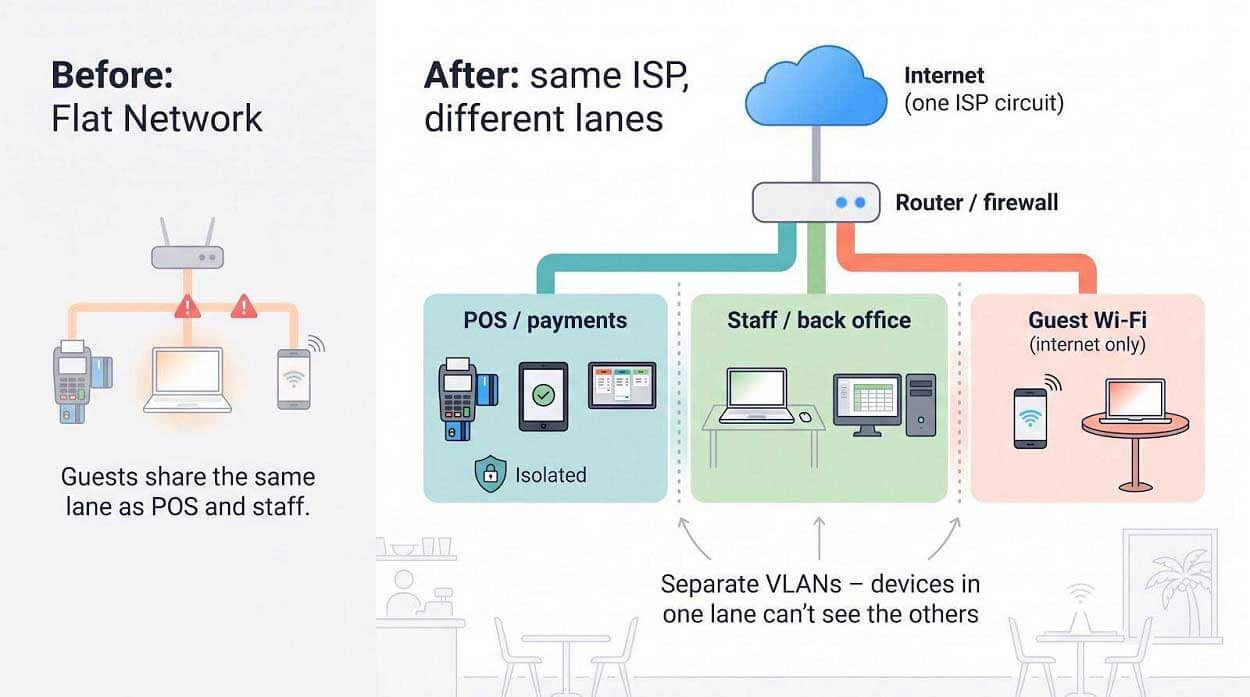
Most “slow-internet” complaints trace back to flat networks where TikTok uploads choke payment calls. Once you segment, a guest streaming the match in 4K never steals the bandwidth reserved for online orders.
If your ISP gateway lacks real VLAN tools, slip in a UniFi, Instant On, or Meraki firewall between the modem and switch. The hardware cost is tiny compared with one dinner rush of manual card imprints.
Next, we’ll wire those lanes into a four-network recipe any installer can follow.
Four Networks, One Router: A Practical Recipe
Think of your LAN like a spice rack: four jars, flavors never mix.
POS / payments
Card readers, handhelds, and KDS screens live here. Traffic to cloud gateways gets top priority so checks close instantly.
Staff / back office
Office PCs, manager tablets, and inventory scanners ride this lane. It can talk to POS for reporting but stays walled off from guests.
Guest Wi-Fi
Phones and laptops see only the internet. Turn on client isolation so Table 12 can’t cast to the TV over Table 18’s AirPlay.
Cameras + IoT / AV
Security footage, smart thermostats, and streaming music players sit in their own sandbox. If a bargain webcam catches malware, it can’t leap into the POS jar.
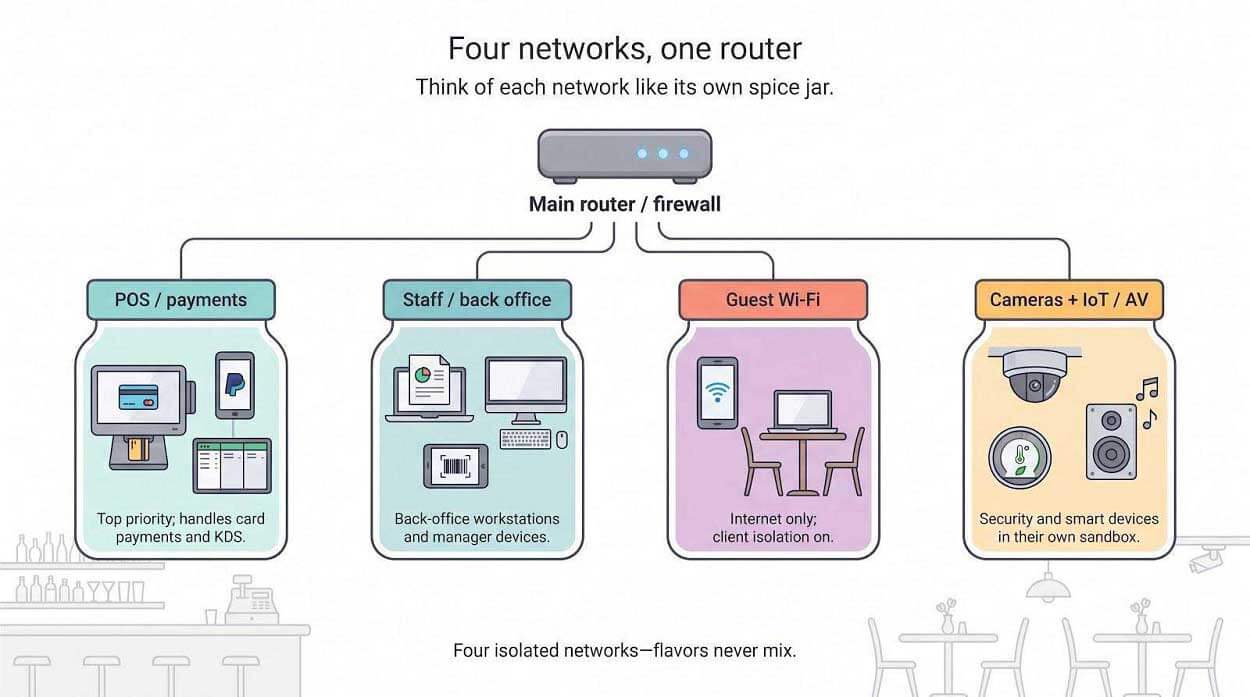
Most business firewalls show a wizard. Pick a color, name the SSID, tag the VLAN ID, and set speed caps. Ten minutes later you have traffic police without touching a single cable.
Toast’s security guide notes that its managed network should host only approved Toast gear. That is another reason these boundaries matter.
Stick to this four-lane plan and a guest Spotify burst will never steal the last packet your payment terminal needs.
Choose Your Wi-Fi Control Layer
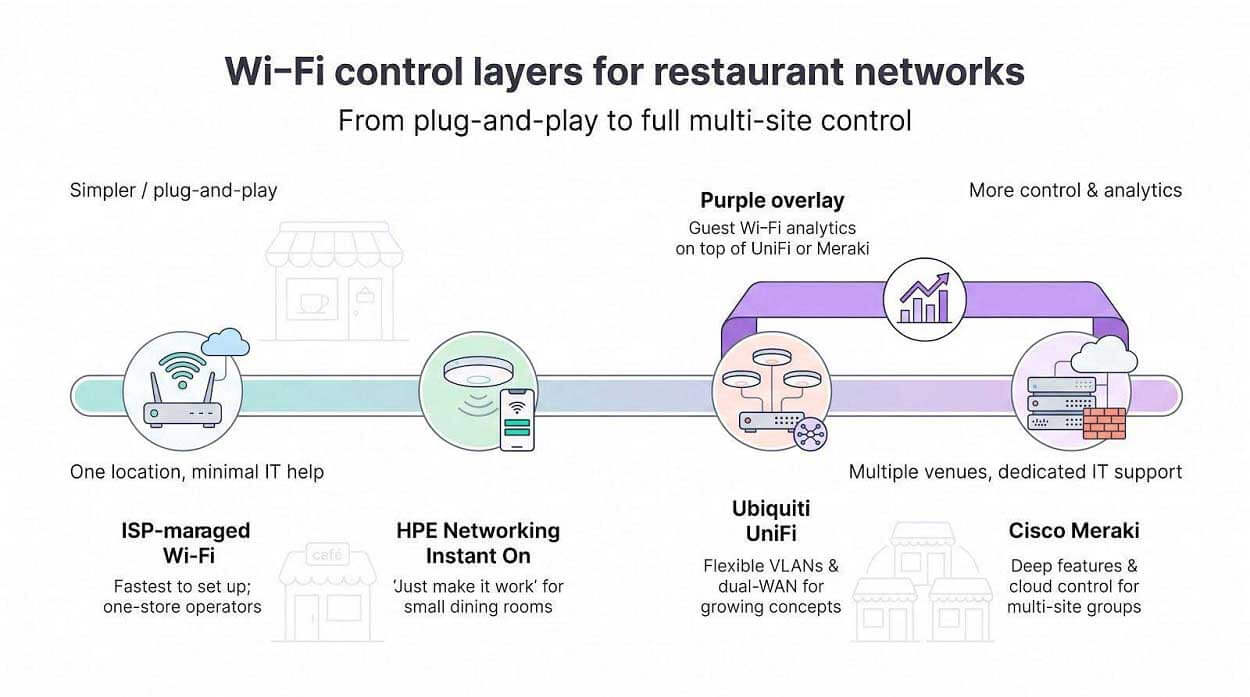
ISP-managed Wi-Fi
The fastest way to tick the Wi-Fi box is to let your internet provider supply and manage the access points. Spectrum Advanced Wi-Fi and WOW! Whole-Business Wi-Fi ship pre-segmented guest SSIDs and phone-friendly dashboards. Plug in the gateway, scan a QR code, and diners are online before the lunch special hits the pass.
Great for one-store operators without IT help: a single support line covers the modem, mesh pods, and captive portal. Firmware and security patches flow automatically, ending the “who owns this?” blame game.
Limits to note: most ISP bundles support only one or two VLANs. If your POS vendor insists on a dedicated router, or if you want per-SSID speed caps, you still need a small firewall in front. Because the hardware is provider-locked, moving from Wi-Fi 6 to Wi-Fi 7 or adding outdoor coverage often means a fresh contract, not a quick access-point swap.
Ubiquiti UniFi
UniFi hits the sweet spot between consumer mesh kits and enterprise Cisco pricing. A $299 Dream Router gives you dual-WAN failover, VLAN tagging, traffic shaping, and a phone-app dashboard. Add ceiling APs at about $150 each, plug them into PoE ports, and watch the controller map signal strength in real time.
Why restaurants like it: flexibility. Spin up four SSIDs (POS, staff, guest, IoT) in minutes, cap the guest lane at 10 Mbps per device, and route traffic through a branded splash page if marketing wants email captures. Patio remodel block an AP? Mount another and the mesh self-heals without a truck roll.
Catch: configuration discipline. A mistapped checkbox can merge VLANs or expose management ports. Budget a few consulting hours from a hospitality-savvy installer to lock down firewall rules and document the layout. After that, updates flow automatically and the same console scales to your tenth location.
HPE Networking Instant On
Instant On targets the “just make it work” crowd. Each AP carries its own lightweight controller: open the app, scan a QR code, and finish a five-minute wizard that creates separate staff and guest networks, basic VLAN tags, captive portals, and WPA3 security.
Sweet spot: a 1,000 to 3,000 sq ft dining room without an IT team. Firmware and threat-signature updates push automatically, and the cloud licence is free for life.
Trade-off: limited analytics. Instant On shows device counts, bandwidth, and rogue AP alerts but stops short of per-app shaping or multi-site heat maps. If marketing wants dwell-time reports, you’ll need Purple or a step up to Cisco Meraki.
Cisco Meraki
Meraki shines once you run more than a handful of venues. Every switch, firewall, and AP phones home to the same cloud dashboard, so a regional tech can reboot an AP in Gulfport while sipping coffee in Tampa.
Features run deep: dual-WAN, per-app shaping, splash pages, VLAN mapping, PCI scan reports, the full toolkit. The cost is equally deep: hardware runs two to three times UniFi, and each device needs an annual or multi-year cloud licence; skip it and the gear goes dark. Check model lifecycles: Meraki Go ended sales in 2025, and older MR APs have posted end-of-support dates.
Meraki makes sense when you need 24×7 central monitoring and plan to layer marketing analytics such as Purple. For a single taco stand, the spend is steep; for ten stands, the single-pane visibility saves truck rolls.
Purple overlay
Purple isn’t a router or AP; it’s a cloud service that bolts onto gear you already own (UniFi, Meraki, Aruba, or Ruckus) and turns the captive portal into a marketing engine. Diners hit a branded splash page, sign in with email or social, and Purple pipes visit data to Mailchimp, HubSpot, or your loyalty app.
Why bother? Repeat business pays rent. The service tracks dwell time and visit frequency; you can email a coupon when a Friday regular misses two weeks.
Pricing starts around $2 to $3 per day per site, billed annually. Remember the privacy lift: you collect personal data, so include a consent tick box and run all analytics over HTTPS. Add Purple only after you have stable, segmented Wi-Fi; Cisco Meraki’s location APIs feed richer insights than a low-end mesh kit.
Choose the control layer that fits your stage: ISP gear for speed, UniFi or Instant On for flexible SMB budgets, Meraki for multi-site scale, and Purple when marketing wants to mine the guest portal for repeat revenue.
Add Backup Internet Before the Dinner Rush
Primary circuits fail for simple reasons: backhoes cut fiber, a pole tips in a storm, or a modem dies. When that happens at 6 pm, tickets stack up, online orders time out, and tips vanish by the minute. A secondary WAN (a second internet line) is the cheapest insurance you’ll buy.
Start with path diversity. Pair cable or fiber with 5G or Starlink so one outage can’t knock out both links. Feed each circuit into a dual-WAN firewall set to “failover” or “load balance.” Test the cut-over on a quiet afternoon; the swap should finish in under ten seconds, and diners should never notice.
Next, protect the power. Gateways, switches, and access points die as fast as the lights. A small UPS keeps the modem, firewall, and POS tablets alive for 15 to 30 minutes, enough to close checks and switch to offline mode if the blackout drags on.
Finally, throttle during backup. Cap the guest SSID at 1 Mbps per device and block video so payment, VoIP, and online orders get every last packet.
Backup checklist
-
Separate carrier and physical path
-
Dual-WAN router with automatic failover
-
UPS sized for at least 15 minutes
-
Monthly switchover test during off-hours
-
Written plan for offline payment if both links drop
Treat backup like a smoke detector: inexpensive, often ignored, priceless the night it saves the house.
New Fiber Builds Are Coming, but Block-Level Checks Still Win
St. Petersburg is seeing new fiber construction from several providers, including IQ Fiber and the existing Frontier and AT&T networks, alongside property-by-property builds aimed at condos and hotels.
Exciting, yes, yet availability is still surgical. A splice case on one pole doesn’t guarantee service to the bistro next door if the landlord never signed an access agreement. Lesson: verify every address, every time, using the FCC National Broadband Map and each provider’s own checker.
In practice we quote the providers that serve the site today and flag newcomers for re-negotiation 24 months out. Early adopters rarely regret symmetrical upload, but betting on dark glass can leave a restaurant running on 5G long after the ribbon-cutting photos fade.
Questions to Ask Before Signing
Sales reps tout download speed and promo gifts, but you care about total cost and operational risk. Run through this ten-point check before you autograph the order. A 10-minute call today can save 36 months of regret.
-
What is the written upload speed, not just the download? Cloud POS, cameras, and delivery APIs live on uploads; get the number in the quote, not a shrug.
-
Does the price jump after the promotion? Note the standard rate and the exact month it kicks in. A sweet 50-dollar starter tier that jumps to 110 in month 13 tells a different story.
-
Is there a term commitment or early-termination fee? Some carriers bill the full balance, while others use a declining formula. Know the penalty before you open a second shop.
-
What equipment fees apply? List modem, gateway, mesh pods, static IP, and backup modem. Small rentals add up to four figures over three years.
-
Will a static IP survive failover? Many LTE or 5G backups switch to dynamic addresses, breaking payment-gateway allow-lists and VoIP trunks.
-
Is guest Wi-Fi really isolated from POS gear? Ask for VLANs or a separate Toast-approved network if your POS vendor requires it.
-
What SLA (service-level agreement) or repair window is in writing? “We try hard” is not an SLA; look for a time-to-repair guarantee or service-credit table.
-
How long from signed order to live traffic? Fiber builds can take weeks, while cable often installs in days. Match the timeline to your opening-day plan.
-
Who handles after-hours support? A local number with on-call techs beats an offshore script when the modem blinks at 9 pm on Saturday.
-
Will the provider supply an as-built network diagram? You need a map for audits, PCI reviews, and the next installer who pulls new drops.
Frequently Asked Questions
How much internet speed does a small restaurant need?
Most independents run smoothly on 300 to 500 Mbps down and at least 25 Mbps up. Segmentation and backup matter more than headline download speed.
Should guest Wi-Fi be separate from the POS?
Yes. Put POS traffic on its own VLAN or a dedicated Toast router; guest devices should see only the open internet.
Can the POS and guest Wi-Fi share one ISP?
Yes, if the LAN is segmented. A second ISP solves outages, while VLANs solve security and congestion.
Is fiber always better than cable?
Fiber’s symmetrical uploads and low latency help cloud POS and cameras, but a well-provisioned cable line with independent backup often beats unavailable fiber.
Is 5G reliable enough for primary service?
For pop-ups and food trucks, often yes. For a 150-seat dining room, keep 5G as a tested backup behind wired broadband.
Does Starlink work through Florida storms?
Speed dips in severe rain, yet the orbiting path keeps packets moving when shoreline cables flood. Mount the dish with clear sky and add a UPS.
How many access points does a 2,000-square-foot space need?
Usually two: one by the kitchen, one covering bar and patio. An RF survey beats square-foot rules of thumb.
Will VLANs alone make us PCI compliant?
No. Segmentation narrows scope, but you still need policies, strong passwords, patching, and annual self-assessment.
Do we need Wi-Fi 7 hardware today?
Not yet. Wi-Fi 6 handles current phones and tablets. Buy Wi-Fi 7 when you upgrade cabling or plan a five-year hardware cycle.
Who pays if the provider misses the install date?
Most quotes list the date as a “standard interval,” meaning no penalty. Negotiate service credits or plan temporary 5G if delays threaten your opening.
Conclusion
Great food needs great connectivity. St. Petersburg’s savviest restaurants treat the internet like any other critical ingredient: source it carefully, store it safely, and keep a spare in the cooler.
Here’s the recipe that works: choose a wired primary circuit your exact address can get today, segment guest devices off the POS, add an independent backup, and plug the whole stack into a UPS. Test failover every month and file a network diagram next to the liquor licence.
Follow those steps and outages fade to background noise. Diners keep scrolling, tickets keep printing, and revenue keeps flowing, whether the local cable hums or storms rattle the poles.
Price out at least two wired quotes and one backup option this week. Your future dinner rush will thank you.